How to Create Realistic Product Mockups from Any Photo (T-Shirts, Mugs, Tote Bags and More)
Why Most Mockup Libraries Leave Sellers Frustrated
If you have been selling on Etsy for any amount of time, you have probably felt the ceiling that comes with using a fixed mockup library. You find a tool that has some decent t-shirt templates, but then you launch a mug design and nothing matches your aesthetic. You switch to a different service for tote bags, juggle subscriptions, and somehow still end up with product photos that look inconsistent across your shop.
The real pain is not just the cost. It is the feeling that you are always fitting your creative vision into someone else's mold. The mockup libraries available to most sellers were designed with average products in mind: a white t-shirt on a plain background, a standard mug with a flat front panel, a basic canvas tote. And for a lot of sellers, that is fine. But as your shop grows and your brand gets more specific, average starts to feel like a limitation.
There is another problem that is less talked about: many mockup generators treat product surfaces as flat. They paste your design onto an image without accounting for the actual shape of the object. The result is a design that looks correct in isolation but clearly fake when a buyer looks closely. A graphic on a mug that does not wrap around the curve. A print on a hoodie that does not follow the fabric folds. These details matter more than people think, and experienced buyers notice them immediately.
This is the gap that Mockupanda's product template creator was built to close.
What the Product Template Creator Actually Does
The core idea is simple: you take a photo of any product you own or want to sell, upload it to Mockupanda, and the tool transforms it into a professional mockup template that you can use over and over with different designs.
What makes this different from just overlaying an image on top of your photo is the surface warping. When you or your customers look at a t-shirt mockup, the design should appear to live on the fabric, not float above it. It should compress slightly around the side seams. It should follow the subtle curve of the chest. It should look like it was actually printed there.
Mockupanda achieves this by analyzing the physical depth of your product photo. Using a technique called depth estimation, it builds an invisible map of how the surface curves and recedes in three dimensions. Then, when you upload a design, it uses that depth information to calculate exactly how the artwork should stretch, compress, and bend to follow the real surface of the product. The result is a mockup where your design looks genuinely integrated into the product rather than digitally applied.
The best part is that this whole process is automatic. You do not need to manually warp anything, set perspective points, or understand any of the technical details. You upload your product photo, the tool does the analysis, and in a few seconds you have a template ready to use.
What Kinds of Products Work
This is where things get interesting, because the answer is essentially: anything you can photograph.
The obvious categories work beautifully. Apparel like t-shirts, hoodies, sweatshirts, tank tops, and long sleeves are perfect candidates because the surface has natural curves and folds that the warping system handles well. Drinkware like mugs, tumblers, and ceramic cups work especially well because the cylindrical surface creates a distinctive warp that flat mockups can never replicate convincingly.
Bags are another strong category. Tote bags, canvas bags, backpacks, drawstring bags, and pouches all have interesting surface geometry that makes warped mockups look dramatically more realistic than flat composites. The natural sag and fold of fabric, the way handles cast subtle shadows, the texture of the canvas material: all of this is preserved in the photo and carried through into the final mockup.
Home goods round out the most common use cases: throw pillows, blankets, wall tapestries, aprons, and tea towels are all excellent template sources. If you have ever tried to sell a pillow design and been frustrated that your mockup looks like a design was just dropped onto a rectangle, this feature directly solves that.
But the more exciting applications are the less obvious ones. Sports equipment, accessories, phone cases, notebooks, shoes, hats, bottles, boxes, and packaging of all kinds can all become templates. If you can photograph it and it has a surface where artwork could appear, Mockupanda can turn it into a working mockup template. This opens up the ability to create highly niche, highly specific templates that no generic library would ever include, which is exactly the kind of differentiation that stands out in a crowded Etsy marketplace.
How to Create a Template Step by Step
The process is designed to be as friction-free as possible, which matters a lot when you are building a product catalog and do not want to spend hours on setup.
Start with a good photo
The quality of your template is directly tied to the quality of your input photo. You do not need a professional studio setup, but a few things help: good lighting with minimal harsh shadows, a clear view of the surface where you want artwork to appear, and a background that separates cleanly from the product. Natural daylight near a window is often all you need. If you are working with apparel, a photo on a mannequin or flat lay on a clean surface both work well.
Upload and let the analysis run
Once you upload the photo, Mockupanda runs the depth analysis automatically. This is the part that would have required expensive software or a technical background just a few years ago, and now it takes about two to three seconds in your browser. The system builds its understanding of the product's surface geometry and prepares the warping data in the background.
Set your artwork placement area
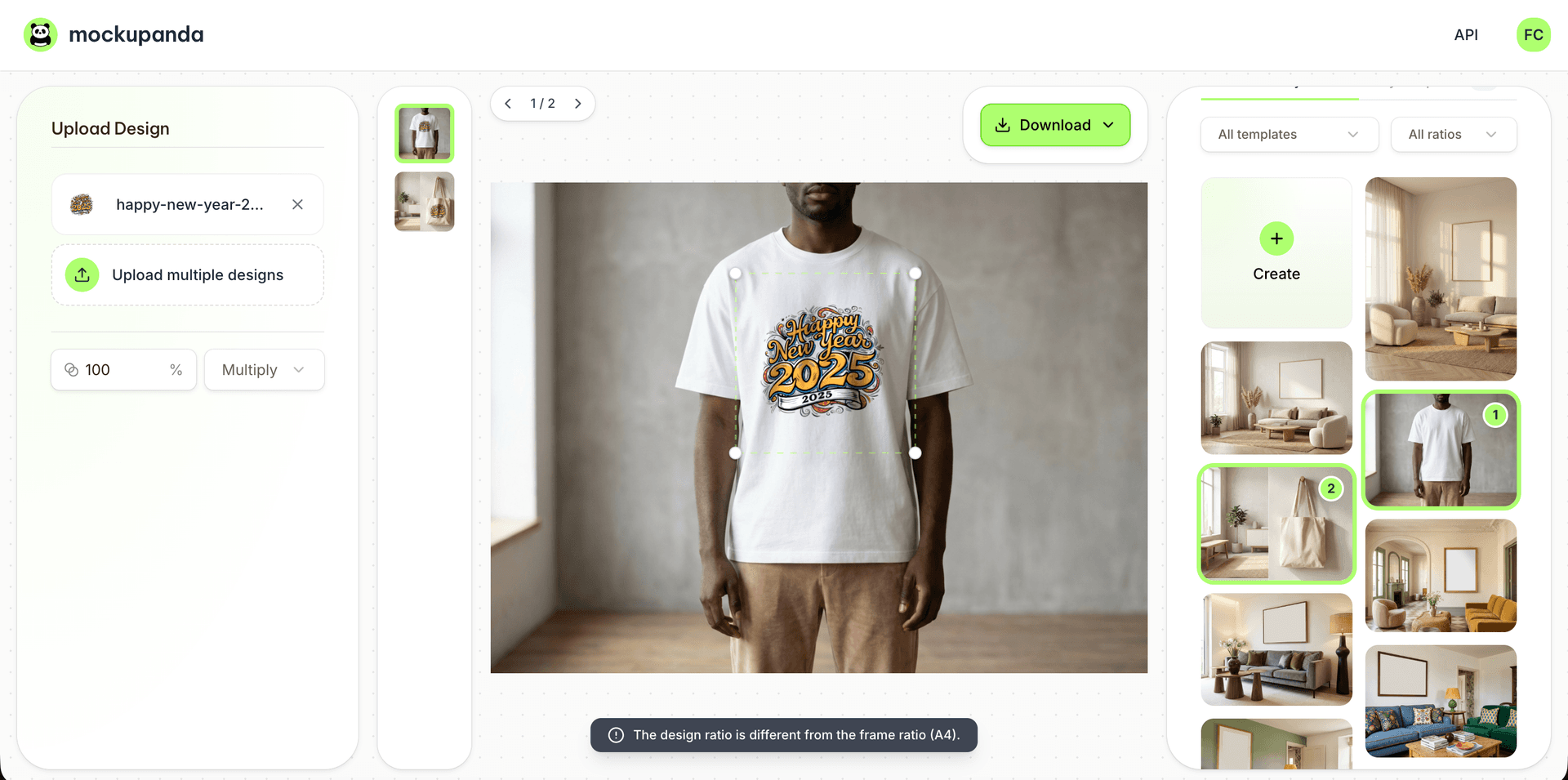
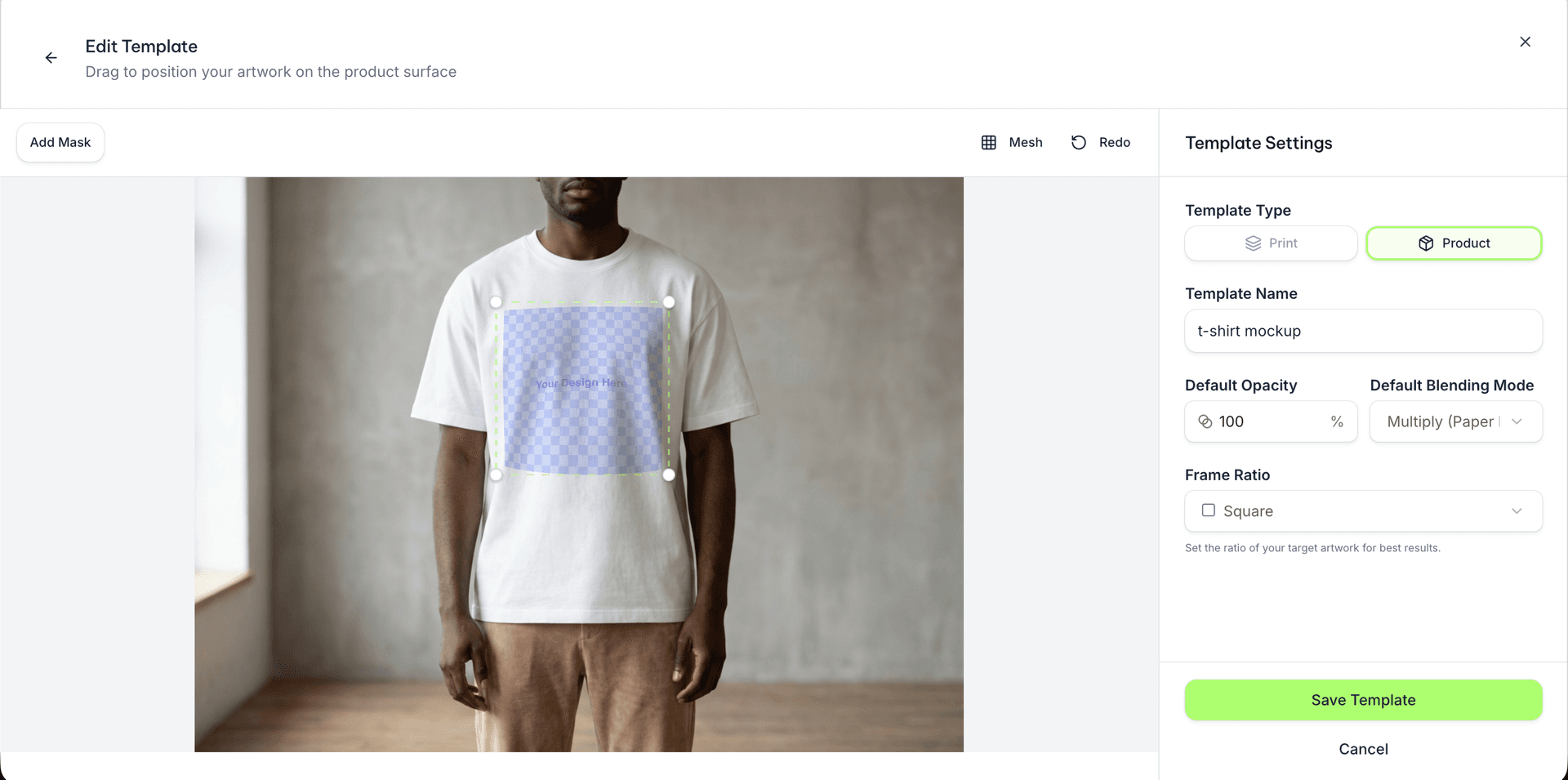
The tool automatically detects where artwork placement makes the most sense on your product and shows you a live preview with a placeholder pattern that moves and warps realistically as the product surface curves. You can drag to reposition the artwork area, resize it, and see in real time how any design would appear on that surface. There is even an option to visualize the actual warp grid, which shows you the mesh of distortion the system is applying.
Preview with your design
Switch from the placeholder to your actual artwork and see exactly how it will look. At this point you are looking at a real rendered preview that applies your design to the surface with full warping applied. You can also adjust the blending mode, which controls how your design interacts with the texture and lighting of the product photo. Multiply blending, for instance, lets shadows and wrinkles show through your design naturally, which is what makes fabric mockups look believable.
Save and reuse
Once you are happy, save the template. It becomes part of your personal template library in Mockupanda, ready to use any time you upload a new design. A template you create today can generate hundreds of different mockups over the lifetime of your shop without any additional setup.
Why Surface Warping Changes the Perception of Your Products
There is a practical business reason to care about this beyond the aesthetics. Buyers on Etsy are sophisticated. They browse hundreds of products a day, and they have developed an unconscious eye for which mockups look real and which look like someone ran a design through a filter.
When your mockups look genuinely realistic, a few things happen. First, buyers can actually imagine owning the product. They can picture the mug sitting on their desk or the tote bag hanging from their shoulder. That emotional connection is what converts browsing into buying. Second, realistic mockups signal craftsmanship. A seller who presents products with professional, convincing visuals reads as someone who takes their work seriously. That perception carries through to pricing: shoppers are more willing to pay premium prices when the product presentation matches a premium standard.
This is something that is hard to achieve with flat mockups, no matter how good the underlying design is. A pattern that looks incredible in Illustrator can look cheap and unconvincing when it is pasted flat onto a product photo. But that same pattern, when warped properly to follow the curves and texture of the surface, can look like it was photographed directly on a finished product.
The warping also handles something that most sellers do not consciously notice but buyers definitely do: the way artwork interacts with the physical characteristics of the product. The sheen of a mug's glaze. The subtle folds in a cotton t-shirt. The texture of a canvas tote. All of these are captured in the shading map that Mockupanda generates alongside the warp mesh, and they are applied on top of your design in the final render. This is what gives the mockup that extra layer of believability that separates it from a basic digital composite.
Building a Template Library That Grows with Your Shop
One of the most valuable things about the product template creator is the compounding return it generates over time. The first time you create a template, you are investing a few minutes to set it up. Every mockup you generate from that template after that point is nearly instant.
Think about what that means for a shop that expands its product range. If you add a new colorway, a seasonal design, or a collaboration piece, you already have templates ready for every product type in your lineup. You do not start from scratch. You upload the new design, pick the template, and generate the mockup. That speed is what lets you move quickly when you spot a trend or respond to buyer feedback.
It also means you can maintain consistency across your shop without extra effort. When all your mockups come from templates you created with your own photography, they naturally share a visual style: the same lighting, the same aesthetic, the same level of quality. That coherence is something buyers notice even when they cannot articulate it. A shop that looks consistent signals an intentional brand, and intentional brands command loyalty and higher prices.
This is the vision behind the product template creator in Mockupanda: not just a one-off tool for generating a single image, but infrastructure for building a professional visual identity that scales as your shop does. You photograph your products once, turn them into templates, and they work for you indefinitely.
Getting Started with Your First Template
The best way to understand what this feature can do is to try it with something you already have on hand. Grab your phone, take a clean photo of a product you sell, and upload it to the template creator. You do not need to have a design ready yet; the placeholder preview is enough to see how the warping works and whether the surface detection picked up the right area.
If you sell physical products that you manufacture or source yourself, start with those because you have complete control over the photography. If you are drop shipping through a print on demand service, reach out to your supplier for product samples, or check if they provide blank product photos you can use as template sources.
For sellers who are just starting out and do not yet have physical samples, the template creator works with any product photo, including stock photos of blank products. The warping system does not care where the image came from. As long as the surface is visible and the lighting gives the depth estimation enough information to work with, you will get a working template.
Mockupanda handles the rest automatically, and once your first template is saved, you will understand immediately why this approach is so much more flexible than relying on a fixed library of someone else's products. Your products deserve mockups that look exactly like yours. Now you can build them yourself.
Keep reading
Best Mockup Tools for Print Sellers in 2026: An Honest Comparison
How to Set Up a Shopify Store for Digital Wall Art Prints: The Product Page Checklist That Converts